TSR Screener - 1 min to Qtr Tick, Tech & Funda -
Auto Refresh, Web/Mobile Alert, Back Test | Want to Explore? -
Request For Demo
Triple Bottom Scanner
No Records Found. Please try with some other criteria
Triple Bottom Chart Pattern Scanner
What is Triple Bottom?
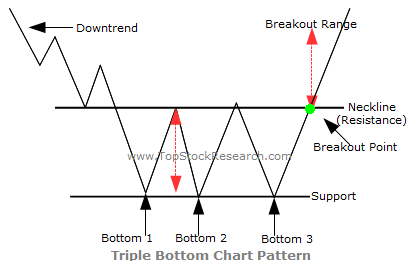
Triple Bottom is a bullish reversal chart pattern that typically forms after a prolonged downtrend. It indicates that sellers have failed to push the price below a strong support level on three separate occasions, suggesting that buyers are gaining control. The pattern is confirmed when the price breaks above the resistance level, known as the neckline.
How the Triple Bottom Pattern Forms
- The price declines and forms the first bottom.
- A recovery creates a resistance level known as the neckline.
- The price falls twice more, forming two additional bottoms near the same support level.
- Each decline is followed by a bounce, showing that buyers continue to defend the support.
- A breakout above the neckline confirms the bullish reversal.
Trading Strategy
- Wait for the price to close above the neckline before entering a trade.
- Many traders place a stop-loss below the third bottom.
- A common price target is estimated by measuring the distance between the bottoms and the neckline, then projecting it upward from the breakout.
- Higher trading volume during the breakout provides stronger confirmation.
Advantages
- Provides a reliable bullish reversal signal after a downtrend.
- Offers clear entry, stop-loss, and target levels.
- Multiple tests of support increase confidence in the pattern.
- Works across various trading timeframes.
TSR Scanner Features
- Real-Time Alerts: Set up alerts to get notified exactly as the condition meets.
- Fine-Tune Filter: Combine with volume and TSR strength index for better accuracy.
- Custom Tracking: Filter signals based on specific stock baskets or your personalized watchlist.
- Backtesting Capabilities: Evaluate historical data to gain confidence.
- Flexible Timeframes: Filter intervals from 1-minute to monthly ticks.
- Auto Refresh: Keeps your scanner data continuously updated.
Fine Tune : You can customise these screeners by clicking on 'Fine Tune Filter' Option
Caution : All these screeners are crafted based on some historical scenarios which may / may notbe applicable here. We recommend to fine tune them according to current market conditions or seek expert advise before taking any decision.